Broadcast Studio Orchestration Platform

One Studio. One System. Complete Control.

Professional broadcast orchestration software connecting video, devices, graphics and automation in one unified production environment.

Currently in active development.
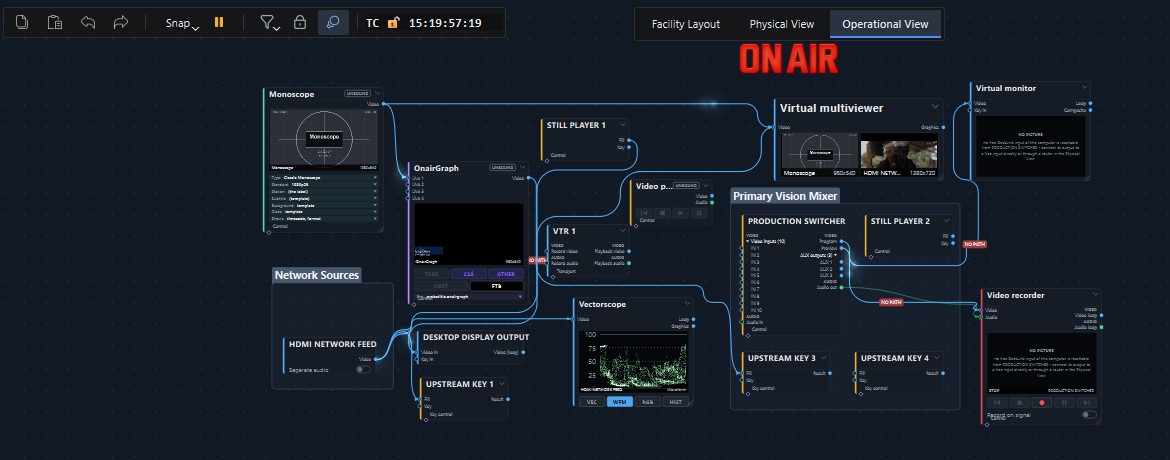
Operational View canvas in OnAirRender Studio: a monoscope, an OnAirGraph graphics node, still and video players, a VTR and a network source connected to a production switcher in a Primary Vision Mixer group, with a virtual multiviewer, a vectorscope, a virtual monitor and a video recorder as destinations. Open full-size image

The Operational View in the current development build.

The unified studio

A Studio Is More Than Its Equipment.

Modern broadcast environments combine cameras, switchers, routers, recording systems, graphics engines and control interfaces. OnAirRender Studio brings these systems into a unified operational model, helping production teams manage complex workflows from one place.

  1. 01

    Physical Devices

    Equipment as it is installed: discovered on the network and the workstation, or added by the operator.

    • video I/O cards
    • switchers & routers
    • recorders
    • consoles & panels
  2. 02

    Resources

    What each device offers, mapped to this workstation's hardware configuration.

    • video inputs & outputs
    • audio channels
    • control pins
    • network services
  3. 03

    Operational Model

    Logical nodes and directed connections that describe intent: what should reach where.

    • sources & destinations
    • virtual devices
    • connections as intent
    • script bindings
  4. 04

    Production Workflows

    The scripts, panels and operator actions that run the programme.

    • playout & switching
    • recording
    • graphics
    • automation

The diagram describes the architecture. Device support differs per manufacturer and model; see Integrations for verified status.

Platform capabilities

Built Around How a Studio Actually Works.

Operational View

Build and operate production workflows using connected functional nodes.

Available

Physical View

Represent equipment, connections and signal paths within your studio infrastructure.

Available

Device Integration

Coordinate supported devices through native APIs and control protocols.

Available

Lua Scripting

Every function of the platform is available to Lua scripts, so any production task can be automated.

Available

Operator Interfaces

Design the operator's own control screen, with live monitors, buttons and lists, and run it with the project.

Available

Real-Time Graphics

Play and operate broadcast graphics designed in OnAirGraph, layered over video and fed with live data.

Available

Resource Management

Organise studio devices and functional resources in a shared operational workspace.

In Development

Control Surfaces

Stream Deck, X-keys and Skaarhoj keys and levers run actions on the devices of the project.

Available

The software

Designed for Real Production Environments.

Every product image on this site comes from the current development build of the application. Device names and values come from test setups.

Operational View

Describe what the production needs, not how every cable runs.

Sources, destinations and virtual devices are placed as nodes. A connection states an intent, for example that a picture should reach a recorder, and OnAirRender works out how to deliver it through the hardware available on the workstation.
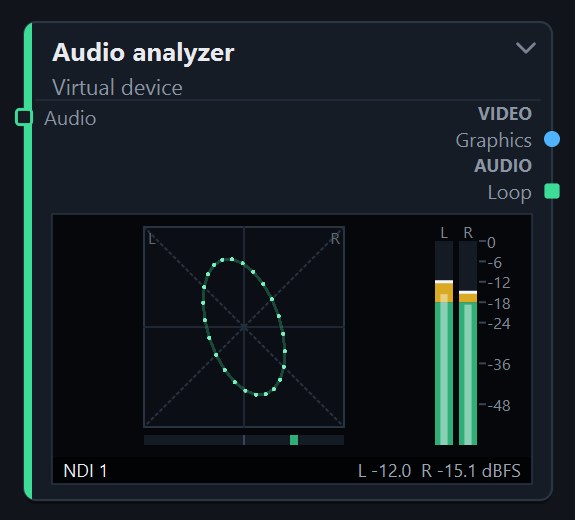
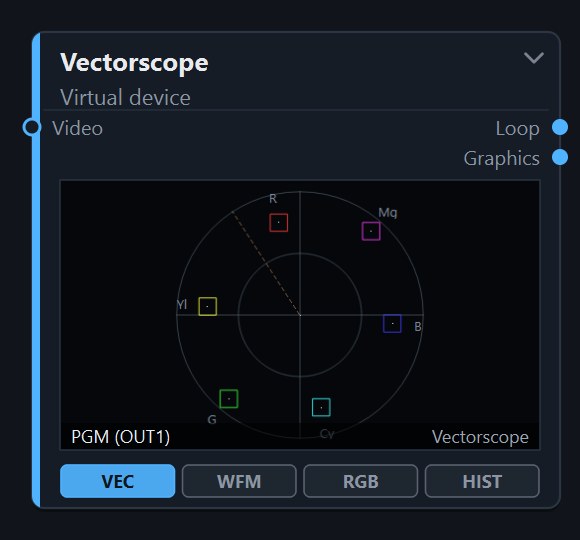
  • Switcher, mixer, multiviewer, recorder, monitor and test-pattern nodes
  • Directed video, audio and control connections
  • Lua I/O aliases bound to specific node ports
Audio analyzer node with a phase display and level meters for an NDI source. Open full-size image
Vectorscope node analysing the programme output. Open full-size image
Operational View nodes rendered from the current development build.

Physical View

Know what is installed, and how it is connected.

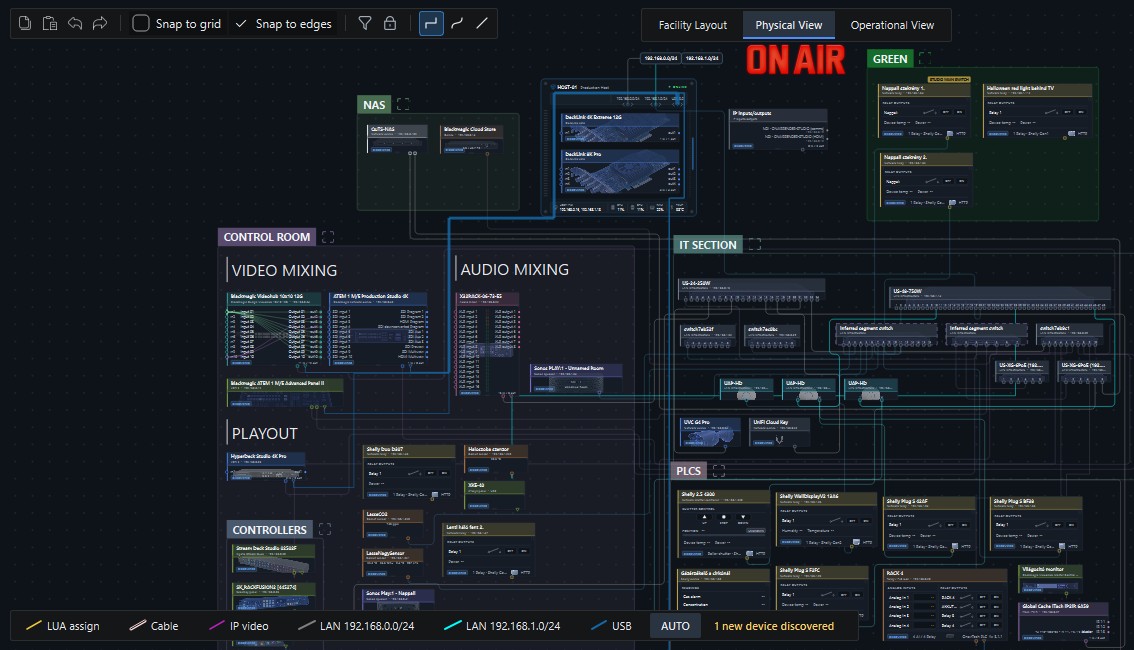
Discovered devices appear with their connectors, rooms and online state. Physical cables, network media transport, USB links and logical routes are drawn as distinct connection types.
  • Device discovery with operator confirmation
  • Network links inferred from switch data, marked as inferred
  • Rooms taken from the facility floor plan
Physical View in OnAirRender Studio: devices grouped by room and function, including a NAS, a control room with video mixing, audio mixing, playout and controllers, an IT section with network switches and a PLC group, joined by colour-coded cable, IP video, LAN and USB connections. Open full-size image
Physical View of a test installation: rooms, device groups and colour-coded connection types.

Device control

Control surfaces become part of the workflow.

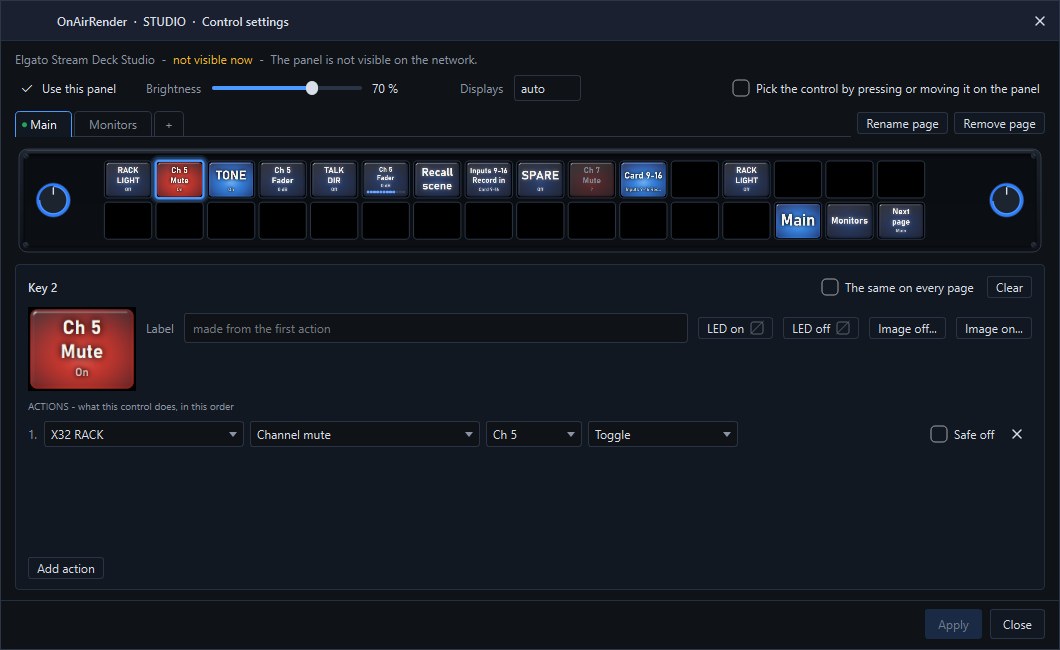
Stream Deck, X-keys and Skaarhoj panels are configured per key and per lever. Each control runs an ordered list of actions on devices in the model, such as an audio channel mute or a router crosspoint.
See supported control surfaces

Control settings window for an Elgato Stream Deck Studio: a key is configured to toggle channel 5 mute on an X32 audio console. Open full-size image
Control settings for a Stream Deck Studio key that toggles a console channel mute.

Operator interface

The control screen is part of the project.

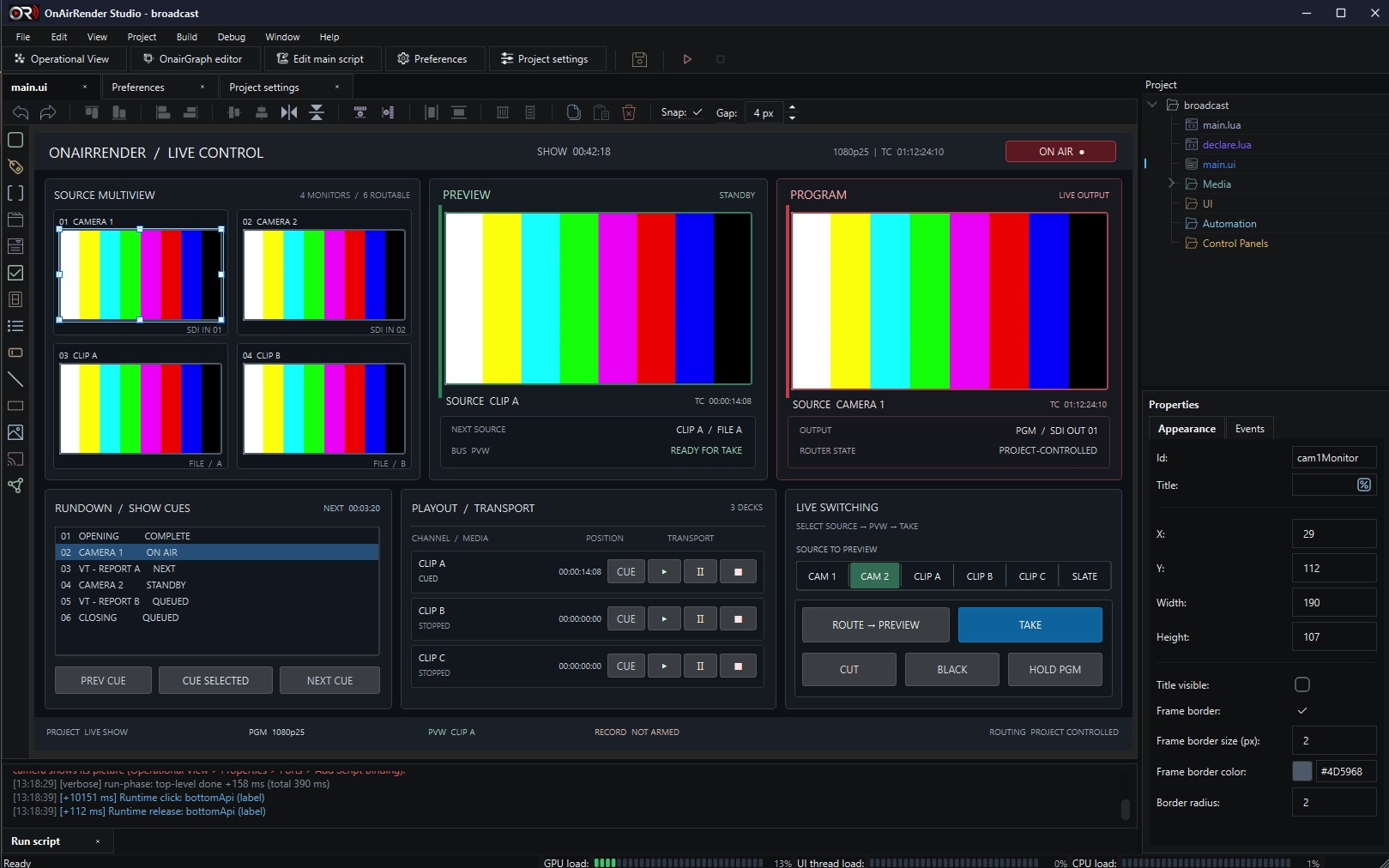
The operator's interface is designed in OnAirRender Studio itself: live video monitors, buttons, lists, tabs and status fields are placed on a canvas, and each control is wired to Lua. A production gets exactly the control screen it needs, from a single take button to a complete live control desk.
  • Live monitors that show any stream of the project
  • Control events handled by the project's Lua script
  • Live values such as the time, the date, system load or a script variable in any text

Read about operator interfaces

The operator UI designer of OnAirRender Studio: a live control layout with a four-source multiview, preview and program monitors, a rundown list, playout transport and live switching buttons on the canvas, the control toolbox on the left, alignment tools above, the project tree and the Properties panel of the selected camera monitor on the right. Open full-size image
Designing a live control screen in the operator UI designer, current development build.

Integration architecture

Built to Connect Your Broadcast Infrastructure.

OnAirRender is designed around an extensible integration architecture, allowing broadcast devices and software systems to participate in coordinated workflows.

Video I/O

Native SDKs bring physical and network video into the engine and back out, each device handled in its own worker process.

  • Blackmagic DeckLinkAvailable
  • NDIAvailable

Routing & Switching

Routers and production switchers are represented as devices whose state can be read and, where validated, controlled.

  • Blackmagic ATEM — discovery and stateAvailable
  • Blackmagic ATEM — switching controlIn Development
  • Blackmagic VideohubAvailable
  • Videohub control panelsIn Development

Recording & Playback

Disk recorders and software recorders participate in the same operational model as every other device.

  • Blackmagic HyperDeckAvailable
  • Software recordersAvailable

Audio & Control

Audio consoles, control surfaces and lighting desks connect through their native protocols.

  • Behringer X32Available
  • Workstation audioAvailable
  • Elgato Stream DeckAvailable
  • X-keysAvailable

Network & Automation

Discovery, scripting and facility devices that let workflows react to and act on the studio environment.

  • Network device discoveryAvailable
  • Lua scriptingAvailable
  • Comet environmental sensorsAvailable
  • Shelly and Arduino Opta relaysIn Development

Graphics

Broadcast graphics are designed in OnAirGraph and played as layers by the OnAirRender engine.

  • Graphics layers over videoAvailable
  • OnAirGraph graphics nodeAvailable
  • Live data in graphicsAvailable
OnAirGraph editor emblem

OnAirGraph

Graphics Are Part of the Production.

OnAirGraph is our broadcast graphics designer. Lower thirds, score bugs, weather graphics and news strips are designed there together with how they behave on air; OnAirRender Studio plays and operates them.

OnAirGraph has its own website with its features, its workflow and its status.

Technology partners

An Open Architecture for Technology Partners.

We are interested in working with broadcast hardware manufacturers, SDK providers and system integrators to expand the capabilities of the OnAirRender platform.

Devices are integrated through their native SDKs and protocols and exposed as resources that workflows can use. Each new integration is validated on hardware before it is described as available.

  • Video input and output
  • Timecode and synchronisation
  • Recording and playback
  • Routing and device configuration
  • GPU-oriented video workflows
  • Network control

Let's Build the Connected Broadcast Studio.

Interested in OnAirRender Studio, hardware integration or a technical partnership? Get in touch.